Pulse Sequence Programming
In this user guide, all the dashboard and Notebook examples shown thus far have used pre-written pulse sequence files. It is important to note, however, that you can write your own novel pulse sequences and execute them on ilumr.
On ilumr, pulse sequences are defined in python program files (.py) and run in notebooks (.ipynb). As an optional step, you can plot your pulse sequence file offline before running it on ilumr.
Program File (.py)
This file is typically used to:
Define the pulse sequence parameters
Set hardware options
Define the data layout
Calculate the timing parameters
Send commands to the ilumr hardware using yield statements
To create a new python program file:
Click the + button in the file browser to open the Launcher tab.
Click the Python 3 button under the Other heading.

Create Python File
ilumr’s inbuilt pulse sequence program files can be found in system > programs. The system folder is read only. If you want to modify an existing pulse sequence file, you will need to copy the file into a new folder.
If you’re new to pulse programming on the ilumr, the Writing Custom Pulse Sequence Programs section is a great place to get started.
Pulse Sequence Plotting Tool
The offline pulse sequence plotting tool is a useful way to visualize your program files and make sure your timing parameters have been set correctly. You can visit our forum post to download the beta version of this tool.
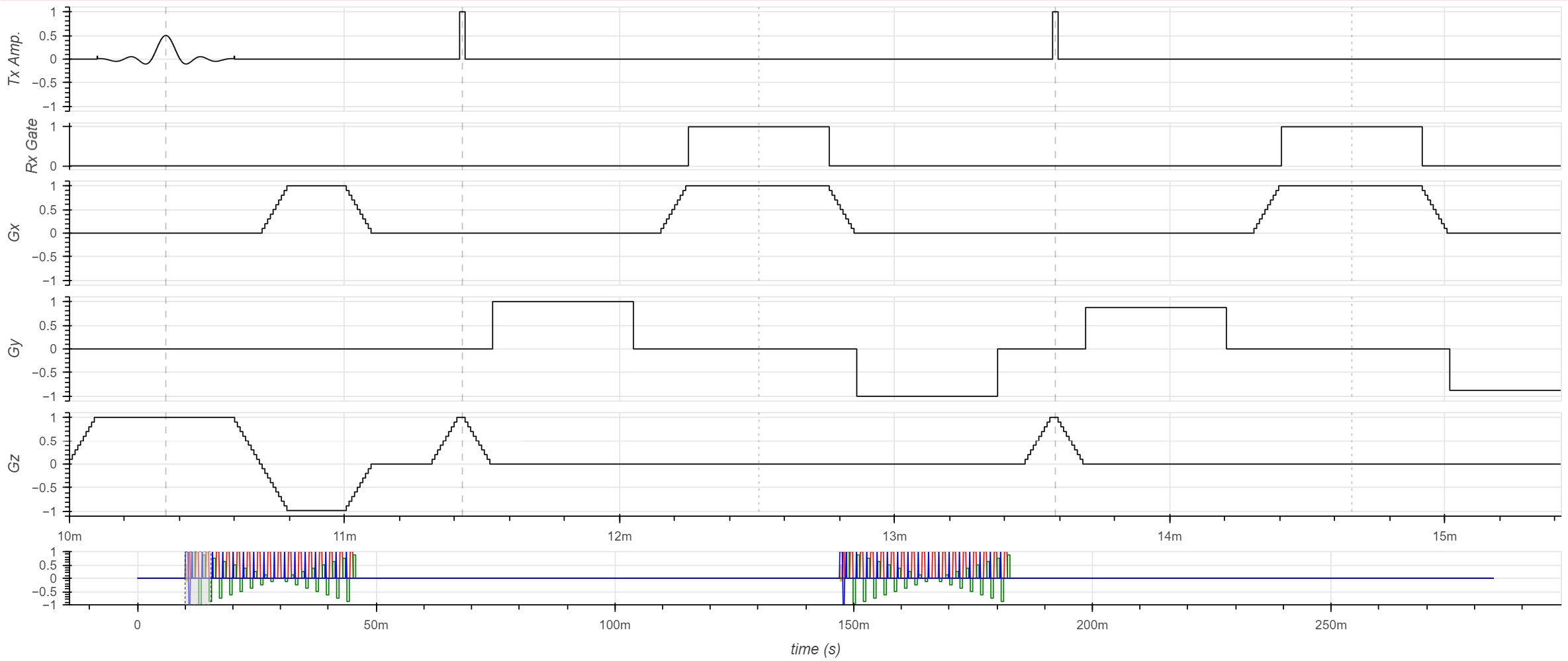
Plotted RARE Pulse Sequence
Running the Pulse Sequence in a Notebook (.ipynb)
To run your pulse sequence in a Notebook, you will need some boilerplate code to:
Load the pulse sequence program file
Load any relevant global variables
Set the pulse sequence parameters
Run the pulse sequence
Process the data
More information on setting up a Notebook to run your custom pulse sequence can be found in the Running a Pulse Sequence section.